Version 2.0.0 for Windows — free to use

Crop a hundred product photos while the kettle boils.

Point CropNimble at a folder of photos shot on a white background — a sheet of paper, a lightbox or a white table, even with the desk showing around it. It finds the item in each one, crops in tight with an even margin, and squares everything up for your listing. Free to use. Nothing uploaded. No clipped corners.

The free version needs no account and no card. Premium is free for 14 days, then $18.99 a month. Cancel anytime.

Crops offline Nothing uploaded No installer needed Zero tracking
CropNimble
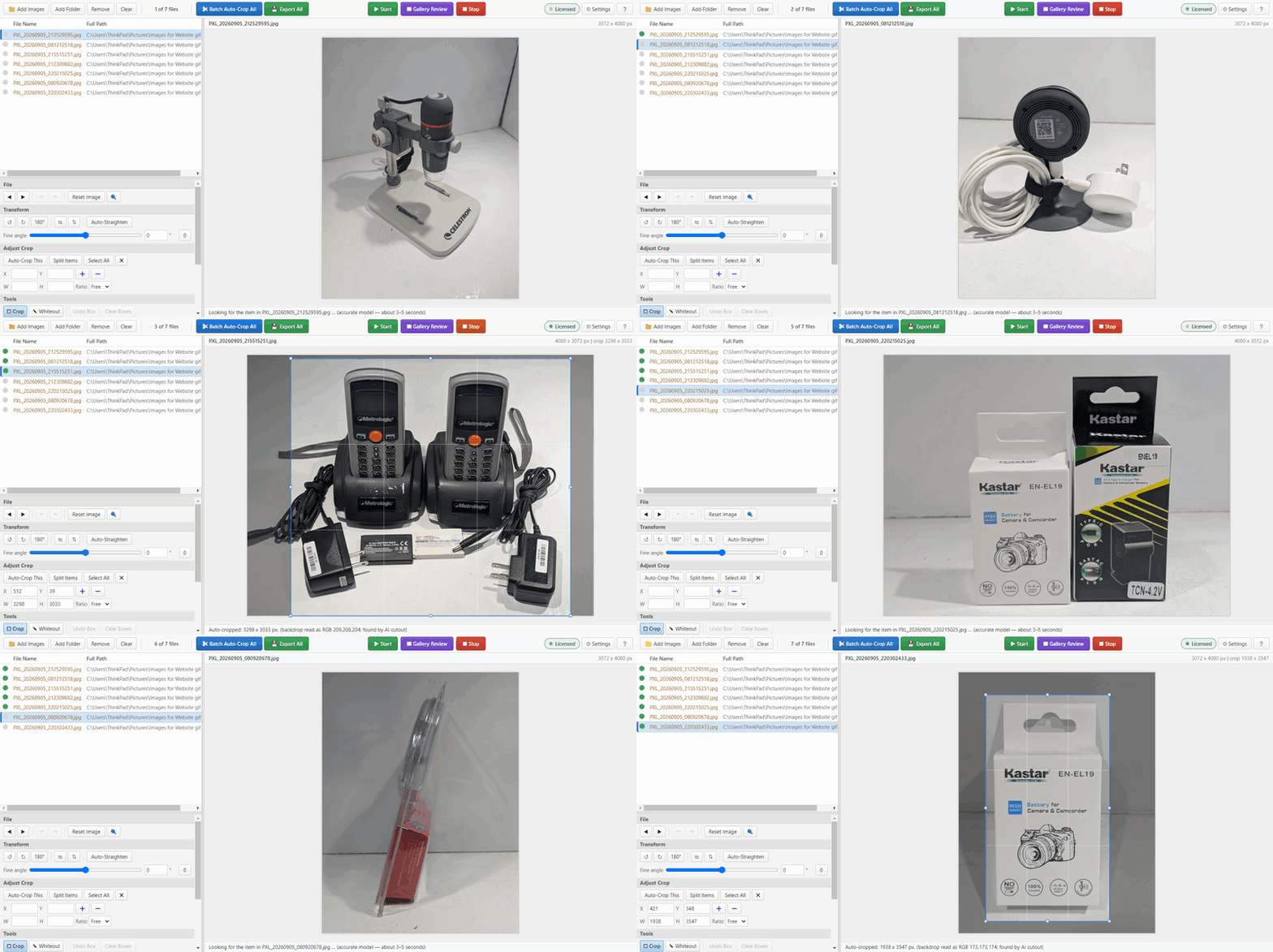
CropNimble running: one product photo after another is opened and a crop rectangle snaps in tightly around the item.

Important: this is built for photos on a white background

CropNimble was designed for one kind of picture — a product shot on a white or near-white background, the sort of photo eBay, Amazon, Etsy and Poshmark ask you to list with. A plain sheet, a lightbox, a white table: that is where it is at its best.

The sheet does not have to fill the photo. If the desk shows around it, CropNimble finds the sheet first, paints the desk out of its working copy, and looks for the item on the paper. The crop stays on the paper, and an item that runs off the paper's edge is marked amber so you can check it.

Photos with a busy or coloured background — a carpet, a worktop, a patterned cloth — are not what it was made for, and it may not find the item. Please try it on your own photographs first. That is what the free version and the 14-day trial are for.

The part that actually matters

It will not cut into your item.

Every crop is measured from where the item actually is, then given a safety margin on all four sides. CropNimble does not just take the AI's word for where that is: it checks the answer against the photo itself — the hue of the item against the paper, its outline, its contact shadow — so a pale strap the model barely noticed still ends up inside the crop. When a crop was reached in a way that is sometimes wrong — a cable running out of the frame, a photo that is nearly all item — it is marked amber with the reason, so you know which few to glance at. And if it cannot confidently find a subject at all, it refuses and keeps the whole photo, so you spot it yourself instead of discovering a chopped-off handle after the listing goes live.

What it does

Everything you need to list faster

Built for one job — product photos on a white or near-white background — and finished properly rather than broadly. All of this is in the free version.

Finds the item for you

A segmentation model separates the product from the background, then CropNimble checks its answer against the photo's own hue and outlines — so pale, shiny and awkwardly-shaped things survive, including the parts the model alone would miss.

Finds the paper first

The sheet does not have to fill the frame. When the desk shows around it, CropNimble finds the sheet, ignores everything off it, and crops on the paper. A shadow across the sheet is still the sheet, and an item that runs off the paper's edge is marked amber for a look.

Whole batches at once

Load a folder, press Start, walk away. A progress bar with a live countdown tells you when it will be done, and when it is, the summary says how many crops are worth a look — usually a handful out of hundreds.

Gallery Review

See every proposed crop as a wall of thumbnails before a single file is written. Crops worth a second look are marked amber, with the reason — found by outline alone, running out of the photo or off the paper, grown well past what the AI saw — so you check those first instead of opening images one by one.

Fix anything by hand

Drag the crop, rotate, straighten, undo. The automatic result is a starting point you can always overrule — it is never take-it-or-leave-it.

Whiteout brush

Paint out a price sticker, a stray cable or a shadow in the corner. Useful right before export, without opening a second program.

Export the way you list

Square or original ratio, your own margin, JPEG, PNG or WebP, your own filename pattern and output folder. Set it once and it stays set.

Premium

What Premium adds

The free version makes the same crops. Premium removes the limits and adds the two features built for people who do this all day.

Unlimited exports Premium

The 15-a-day ceiling disappears. Run a thousand photos in an evening if that is the evening you are having.

Accurate model, unlimited Premium

Looks three times — the full-size model on the photo, the full-size model again on a contrast-stretched copy that makes a white item on white paper stand out, and the fast model — then weighs all three against the pixels and keeps whatever any of them found: a white strap, a cable-joined plug, the stand under a camera. The free version gets 15 runs to try it; Premium lifts the cap.

Watch folder Premium

Nominate an input folder and CropNimble crops each photo the moment it appears. Originals can be left alone, moved to a subfolder, or sent to the Recycle Bin once the crop has safely been written.

Split Items Premium

Several products in one shot? Each gets its own crop and its own exported file — including items that are touching each other.

Three computers Premium

One subscription covers up to three computers — the desk, the laptop, the one in the stockroom. Replacing one? Sign it out from any of the others.

Keeps working offline Premium

Premium checks your subscription when you are online, then keeps working for up to 10 days without a connection — in a stockroom with no signal, or on the road. The check sends your sign-in, never a photo.

Try every Premium feature free for 14 days

Nothing is charged for 14 days. Cancel before then and you pay nothing.

Real numbers

How long a batch actually takes

Measured on real 12-megapixel product photographs, timed from pressing Start to the last crop finishing.

ModelPer photo, graphics cardPer photo, processor only100 photos
Fastgood for most items, unlimited in the free version ~1½ seconds ~2 seconds about 3 minutes on the card, 3½ on the processor
Accuratethree looks, cross-checked, unlimited with Premium ~2 seconds ~8 seconds about 3½ minutes on the card, 13 on the processor

Timed on a six-core laptop with an NVIDIA Quadro T1000. CropNimble runs the cutout model on your graphics card when it has one it can use (most cards and laptop graphics chips of the last few years), and on the processor when it cannot — the crops are the same either way, only the wait differs. On the processor it uses several cores at once and deliberately leaves the rest free, so the computer stays usable while it works; a four-core laptop is slower still.

Privacy, plainly

Your photographs never leave your computer.

The AI models ship inside the download and run on your own computer. There is no cloud step, no analytics and no telemetry — not a reduced amount, none. The free version needs no account at all. Premium uses one for a single job: checking that your subscription is active. That check sends your sign-in, never a photo, a file name or anything about your pictures.

Weighing it up?

How CropNimble compares

Side by side with the tools sellers usually try first. Every claim about them is linked to their own pages.

Pricing

Free to use. Premium when you need more.

Keep the free version for as long as you like, with no account and no card. Try everything in Premium free for 14 days before you pay a cent.

Free version
$0
No account, no card, no expiry. Use it for your shop.
  • Every crop at full quality, no watermark
  • The Fast model, unlimited
  • 15 exports a day
  • 15 crops with the Accurate model, to try it
  • Gallery Review, crop, rotate, whiteout, undo
  • Watch folder
  • Split Items
Download free

One download for everyone.

14 days free
Premium, monthly
$18.99 a month
Free for 14 days, then $18.99 a month. Cancel before day 14 and you pay nothing.
  • Everything in the free version
  • Unlimited exports
  • The Accurate model, unlimited
  • Watch folder, with delete or archive
  • Split Items for multi-product shots
  • Up to 3 computers
  • Works offline up to 10 days at a time
Start your free trial

You start the trial inside CropNimble.

Save $28.89 a year
Premium, yearly
$198.99 a year
About $16.58 a month, billed once a year. Charged when you subscribe.
  • Everything in Premium, monthly
  • One payment a year instead of twelve
  • Cancel anytime; Premium runs to the end of your year
Get Premium yearly

Want to try first? Start with the free trial.

How the 14-day free trial works

No surprises: you know the date, we remind you twice, and cancelling takes a minute.

  1. Today Start the trial

    In CropNimble, with your email and a card. Nothing is charged, and every Premium feature unlocks at once.

  2. Day 11 First reminder

    We email you: three days left, and how to cancel if Premium is not for you.

  3. Day 13 Last reminder

    One more email: the trial ends tomorrow. CropNimble shows the same reminders in the app.

  4. Day 14 First payment

    Your card is charged $18.99, then every month until you cancel. Cancelled before this? You pay nothing.

Prices are in US dollars; checkout shows any sales tax or VAT for your country before you pay. Payments are handled by Lemon Squeezy, our merchant of record, by card, Apple Pay or Google Pay. Cancel anytime in CropNimble (Settings, then Account, then Manage subscription) or on Lemon Squeezy's billing page. Premium runs to the end of the period you have paid for, then CropNimble carries on as the free version — nothing on your computer is deleted.

Bought CropNimble for $69? Your version-1 licence is yours for good: every 1.x release, offline, no account. What 2.0 means for you, and the version-1 download.

Get started

Download CropNimble

One download for everyone. It starts as the free version, and you can start the Premium trial from inside it whenever you like. To hear about new versions, join the updates list — one email per release, nothing else.

CropNimble 2.0.0 for Windows

Windows 10 or 11, 64-bit — for photos on a white background

Download CropNimble 2.0.0 — free

Zip file, 281 MB, signed by The Motivational Hub LLC. No installer: unzip it and run. SHA-256 0000000000000000000000000000000000000000000000000000000000000000

Free version: no account Premium: 14 days free No installer Photos stay on your PC
1 Unzip it

Right-click the download and choose Extract All. Put the folder anywhere you like.

2 Run it

Open CropNimble.exe. Windows may show a blue "unrecognised app" notice — click More info, then Run anyway.

3 Free, or Premium

Choose Use the free version, or Start the free trial: enter your email, type the 6-digit code we send, and add a card at Lemon Squeezy's checkout. Nothing is charged for 14 days.

Have a version-1 licence? Download version 1.

Before you ask

Questions

Plans, the trial and your account

What does the free version include?

Everything that makes the crops: the Fast model with no limit on how many photos it crops, Gallery Review, cropping by hand, rotating, the whiteout brush and undo — at full resolution, with no watermark. It exports 15 images a day, and you can try the Accurate model on 15 photos in total. It needs no account, you may use it for your shop, and it does not expire. The watch folder and Split Items come with Premium.

How does the 14-day free trial work?

Open CropNimble and choose Start the free trial. You enter your email, type the 6-digit code we send you, and add a card, Apple Pay or Google Pay at Lemon Squeezy's checkout. Nothing is charged for 14 days, and every Premium feature unlocks straight away.

We email you three days and one day before the trial ends, and CropNimble shows the same reminders. If you do nothing, your card is charged $18.99 on day 14 and then every month until you cancel. Cancel any time before day 14 and you pay nothing.

Can I pay yearly instead?

Yes: $198.99 a year, which works out to about $16.58 a month and saves $28.89 against paying monthly. The yearly plan is charged when you subscribe; the free trial is on the monthly plan, so if you want to try first, start there.

How do I cancel?

In CropNimble, open Settings, then Account, then Manage subscription: you land on Lemon Squeezy's billing page already signed in, and cancelling takes a minute. You can also go to Lemon Squeezy's billing page and sign in with the email you paid with. Premium keeps working to the end of the period you have paid for (or the end of the trial), then CropNimble carries on as the free version. Nothing on your computer is deleted.

Why does Premium need an account?

So that your copies of CropNimble can tell your subscription is active. Your account is your email address: you sign in with a 6-digit code we email you, so there is no password to remember or to leak. It holds your email, the names of the computers you have signed in on, and the state of your subscription.

Your photos are never part of it. The check sends your sign-in and the app's version number — nothing about your pictures — and the free version needs no account at all.

Does Premium work offline?

Yes. Cropping never needs the internet. Premium checks your subscription when the computer is online, and keeps working for up to 10 days between checks, so a laptop on the road keeps everything it has paid for.

How many computers can I use?

Up to three at once with one Premium subscription. Replacing one? Sign in on the new computer and choose to sign the others out, or sign the old one out from Settings, then Account, on any of them. The free version needs no account, so it runs anywhere.

What payment methods can I use?

Cards, Apple Pay and Google Pay, through Lemon Squeezy, which handles the payment as our merchant of record and sends your receipts. PayPal is not available yet.

What if it does not work for my photos?

Try the free version on your own photos first: it makes the same crops as Premium, with a daily limit. Then try Premium free for 14 days. If it is not right, cancel before day 14 and you pay nothing.

I bought a $69 licence. What happens to it?

It is yours for good. Your key covers every 1.x release, works offline and never needs an account, exactly as when you bought it. CropNimble 2.0 is a new version whose extras come with Premium, so a version-1 key does not unlock Premium in 2.0 — but the 2.0 free version works for everyone, and version 1 stays available to download. What this means for you.

The crops

Will it ever crop part of my item off?

No. The crop is calculated from where the item is, with a safety margin added on every side. If it cannot confidently find a subject it refuses and keeps the whole photo, so you notice rather than shipping a spoiled picture. And a crop it did make but is less sure of is marked amber, with the reason, so those are the ones you look at.

What does the amber dot mean?

Green is a crop found the usual way. Red is nothing found. Amber is in between: the crop is probably right, but it was reached in a way that is sometimes wrong — the item was found by its outline rather than the AI, it runs out of the edge of the photo or off the edge of the sheet, the photo is nearly all item, or the crop had to grow well past what the AI saw. Hover the dot for the reason, or tick "only issues" in Gallery Review to see just the amber and red ones. On a real batch of 121 listing photos, 19 were amber, and every crop that actually needed a hand was among them.

Does the sheet of paper have to fill the whole photo?

No. If the desk or table shows around the sheet, CropNimble finds the sheet first — the brightest large surface with no colour of its own — paints the desk out of its working copy, and judges the item against the sheet. A shadow falling across the sheet is still the sheet. The crop stays on the paper, and an item that runs off the paper's edge onto the desk is marked amber so you can check it. A grey desk close to the paper's own shade is the one case it cannot separate, and a strongly coloured sheet — blue, say — is not a white background and is refused.

What if my desk is grey?

A wooden desk, a dark desk or a coloured one is easy to tell from the paper. A pale grey desk within a shade or two of the paper is not — CropNimble then sees one large white surface and treats the whole photo as the backdrop, which usually still works if the item is clearly darker or more colourful than both. A strongly coloured sheet, such as blue paper, is refused as not a white background. The free version is the quick way to find out how it does on your own set-up.

What does the Accurate model do that the Fast one does not?

Fast uses the small model and CropNimble's pixel checks — hue, outline, contact shadow — and is right for most items. Accurate adds two more looks: the full-size model on the photo, and the full-size model again on a copy with the contrast stretched around the backdrop, which is what finally makes a white item on white paper visible to it. It weighs all three against the pixels and keeps whatever any of them found. Across three real batches — 330 listing photos — that recovered every strap, plug, stand and base the small model had cropped off, at the cost of a few seconds more per photo. Neither model ever shrinks a crop to guess; when in doubt they keep more, never less. The free version includes 15 Accurate crops to try; Premium has no limit.

Can it handle several products in one photo?

Yes — that is what Split Items, a Premium feature, does. It finds each product and gives every one its own crop and its own exported file, even when they are touching each other. Items pressed together with no visible gap and identical colouring may still read as one; you can then adjust by hand.

Does it use my graphics card?

Yes, when it can. The cutout model runs on the graphics card through WebGPU, which makes the Accurate model about four times faster than on the processor alone. If the card cannot be used — no card, an old driver, a virtual machine — CropNimble runs the model on the processor instead and says so in Settings, under the AI model. The crops are identical either way; only the wait differs. There is a switch in Settings to turn the card off if a driver ever misbehaves.

Does it work on photos that are not on a white background?

It is built and tuned for white or near-white backgrounds, which is what most marketplaces ask for. Busier backgrounds will sometimes work, but that is not what it was made for, and it is not what we would promise.

What are the system requirements?

Windows 10 or 11, 64-bit, about 600 MB of disk space once unzipped, and 8 GB of memory recommended. No installer, no admin rights, and it does not touch your registry.

Why does Windows warn me about the download?

CropNimble is signed by The Motivational Hub LLC — right-click the exe, Properties, Digital Signatures, and you will see it. Windows SmartScreen can still show a notice for a signed program it has not seen often yet, because it also counts how many people have run it. Click More info and then Run anyway. The warning fades as more people install it.